


Smart Home Manager
4.429.74K Reviews
App Specs
- Version
- 2.2607.501
- Updated On
- License
- Free
- Downloads
- 5,000,000+
- Developer
- AT&T Services, Inc.
- Categories
- Productivity
- Platform
- Android, iOS
Screenshots
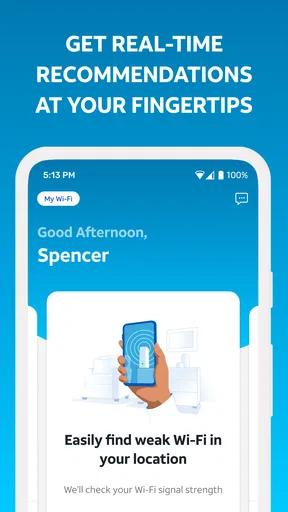
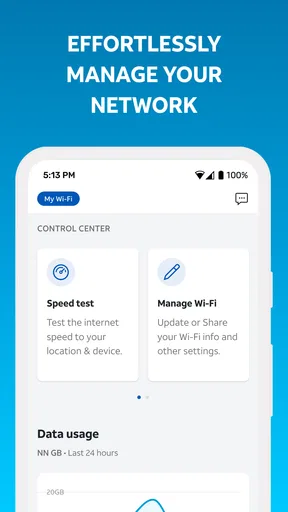
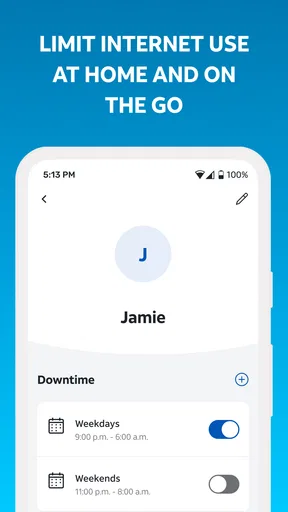
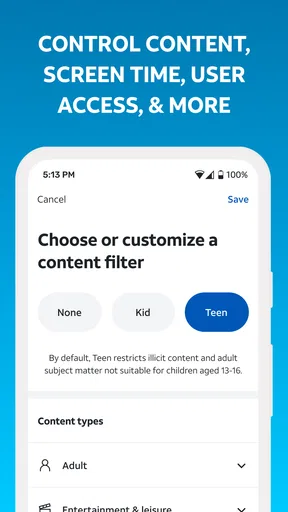
 Analysis by AppCompare
I think the most useful way to judge Smart Home Manager is to ask what kind of “smart home” you actually want to manage. Despite the broad name, this is a productivity app from AT&T Services, Inc. aimed at AT&T Internet customers who want to personalize their Wi-Fi network. That makes its appeal more focused than a universal controller for every connected bulb, speaker, camera, and thermostat in a house. If your main concern is the network that keeps those devices online, it may be worth a look; if you want one place to operate products from many brands, I would keep my expectations narrower.
Trust starts with knowing what the app is for
The distinction matters for trust as well as convenience. A network-management app is close to the center of a household’s digital life: people use the connection for work, school, entertainment, and personal accounts. I would approach it as a practical companion to an AT&T Internet service, not as an independent smart-home hub. That framing helps set sensible expectations before you sign in or make changes.
It is free, rated for Everyone, and has an average rating of 4.4 from around 84,000 ratings. More than five million installs suggest it is used by a sizeable audience, but popularity alone cannot tell me whether an app’s handling of personal information suits my comfort level. I would still read the permission prompts and privacy information shown on the device and in the app before granting access or entering account details. I would not treat the rating as a substitute for that check.
One practical question is whether this makes sense for someone who is not an AT&T Internet customer. The app is described for AT&T Internet customers, so I would not choose it expecting it to manage an unrelated provider’s router or replace that provider’s app. If your internet service is with AT&T, the intended fit is clear. If it is not, your provider’s own tools or the controls built into your router are the more sensible starting point.
What the network focus means in daily use
Personalizing Wi-Fi is different from controlling every connected device. You may still need a light maker’s app for bulb schedules, a thermostat’s app for heating settings, or a speaker’s app for audio. I would use Smart Home Manager for the network side of home life and keep the specialist apps for the jobs they handle directly. That division is less glamorous than a single dashboard for everything, but it avoids expecting one service to replace tools outside its stated role.
That focus can also make it useful in a household where the immediate problem is connectivity rather than gadget control. If a video call stutters in one room while the rest of the home seems fine, the network is the natural place to start investigating. A dedicated internet-service app is more relevant in that moment than opening a lighting app or a general home-automation platform. It does not guarantee a fix, but it gives the network issue the right context.
Visible choices deserve a deliberate check
When I use any account-linked network app, I try to separate actions that change the Wi-Fi experience from actions that change account access or invite other people in. Before confirming a setting, I pause to read what the screen says it will affect. That habit is especially helpful when a home has guests, children, remote workers, or devices that need a stable connection. A quick tap can have a wider household impact than a setting in a single-device app.
Worth Reading Before You Choose

EA SPORTS FC Mobile 26 Is a Bigger Football Game, but It Takes Time

Flipboard Shows What News Apps Must Do Beyond the Feed

Switching to Android Auto Means Rethinking Your Driving Routine

Google Calendar Makes a Crowded Week Easier to Manage

Ludo King Makes the Most of the Minutes Between Plans

Baby Panda World Brings Quick Play to Modern Phones, but Its Game Library Feels Busy
I also recommend checking any permission prompt at the moment it appears rather than approving everything automatically. A permission should make sense for the task you are trying to do; if the reason is unclear, it is reasonable to stop and review the app’s explanation and your device settings. This is not a claim about which permissions Smart Home Manager requests. It is a useful way to keep control of any app that is connected to a home internet account.
Account control is another part of the trust picture. Keep your login details private, use the account’s available security options, and be careful about who can access a device that is already signed in. If another household member needs to help manage the connection, decide together what access is appropriate instead of sharing credentials casually. Those small choices are often more important than a polished interface when the app is tied to a service used by everyone at home.
A realistic reason to open it
Picture a weekday evening when one person is trying to finish a video meeting from the back room, someone else is streaming in the living room, and a child says a tablet has lost its connection. I would start by using the app to look at the home Wi-Fi setup and personalize the network as needed, rather than immediately resetting devices or reinstalling unrelated apps. Then I would check whether the issue is limited to one device or location before changing anything broader. That order helps avoid fixing the wrong problem and disrupting everyone else’s connection.
A helpful habit is to make one change at a time and see whether it improves the situation before trying another. If several settings are altered together, it becomes difficult to tell which one mattered, and reversing course takes more effort. I would also avoid treating a temporary slowdown as proof that the router or service needs a dramatic change; first check whether the problem affects one device, one room, or the whole home. The app’s value here is as a focused place to manage Wi-Fi, not a promise that every connection problem can be solved from a phone.
For a household with several people, it is worth agreeing on who should make network changes and when. A setting that seems convenient to one person may interrupt a work call or a game another person is using. If you are helping a family member troubleshoot, ask what they are currently doing online before changing the network. That bit of coordination is low-tech, but it can prevent the app from becoming the source of a household argument.
How it compares with the usual alternatives
Compared with a router’s built-in admin page, a dedicated app can feel less intimidating for routine network personalization, especially for someone who does not want to navigate technical menus in a browser. Compared with a third-party smart-home hub, however, it has a different job: it is centered on the AT&T internet connection rather than on coordinating a collection of devices from multiple ecosystems. I would choose based on the task, not on which option has the broadest-sounding name.
The provider’s own support channels may be a better route when the connection itself appears to be down or when an account-level issue needs attention. A router’s local controls may be preferable for a technically confident user who wants detailed settings. And device-maker apps remain the straightforward choice for changing the behavior of a particular light, camera, or thermostat. Smart Home Manager is most compelling in the space between those options: a more accessible way for an AT&T Internet customer to work with home Wi-Fi.
There is a trade-off in keeping those roles separate. You may have to switch apps when the problem shifts from internet access to a device’s own settings, and that is not the all-in-one experience some people want. On the other hand, a focused network tool can be easier to understand than a dashboard that mixes router controls with functions from many manufacturers. I would rather use the right tool for each job than assume a single app can reliably control every part of a connected home.
Who is likely to find it useful
I would recommend giving it a try if you are an AT&T Internet customer who wants a straightforward way to personalize Wi-Fi and would rather begin with an app than with technical router menus. It is also a reasonable option for households where one person regularly helps others with connectivity and wants a more convenient place to start. The free price removes a purchase decision, though it does not remove the need to decide whether the service and account relationship suit you.
I would skip it if you are looking for a universal smart-home controller, if your internet provider is not AT&T, or if you prefer to manage your network entirely through local router controls. It is also not a substitute for learning which device is actually causing a problem. Someone who wants advanced control over every connected product may be better served by the manufacturers’ individual apps or a compatible automation system, depending on the devices they own.
The app’s current version is 2.2509.465 and it requires Android 7.0 or later. Those details are worth checking against your phone before installing, particularly if you use an older Android device. The app is free, but I would still consider the time involved in signing in, understanding the controls, and keeping account access secure as part of the real cost of using any connected-service tool.
A measured recommendation
Smart Home Manager has a clear purpose when viewed as an AT&T Internet companion rather than a control center for every smart device. That clarity is its main strength: it points people toward Wi-Fi management instead of promising to replace a collection of specialist apps. My advice is to install it only if that network-focused role matches what you need, then take a minute to review account access, permissions, and the effect of each setting before making changes.
For an AT&T household that wants a more approachable way to personalize its Wi-Fi, I think it is a sensible tool to try. For people seeking broad device automation or detailed router controls, another option will probably fit better. I would judge it by whether it makes the network tasks you actually perform easier, while keeping expectations—and access to your home account—deliberate.
Kicking off with Smart Home Manager is surprisingly straightforward. Once you download it, the app guides you through a seamless setup process. It’s like having a tech-savvy friend walk you through it step by step. You just need to connect your devices, and voilà, you’re ready to go. The app’s interface is sleek and intuitive, making it a breeze even for those not-so-techy folks among us.
Features That Make Life Easier
The real magic of this app lies in its features. You can monitor all your devices from a single dashboard, which means no more switching between different apps. Want to set the mood for a cozy movie night? You can adjust the lights, tweak the thermostat, and even cue up your favorite playlist—all without leaving your couch.
One of the standout features is the app’s ability to detect issues with your devices. If something goes awry, it gives you a heads-up and even suggests fixes. It’s like having a personal assistant keeping tabs on your smart home.
User Experience: Smooth Sailing
Using Smart Home Manager feels like second nature after a while. The app’s design is clean, with everything you need just a tap away. Plus, it supports voice commands, which is a nifty touch if you’re juggling tasks or just feeling plain lazy.
The app also caters to multiple users, so everyone in the household can have access without stepping on each other’s toes. It’s a small detail, but it makes a big difference in keeping the peace at home.
Final Thoughts: Is It Worth It?
If you’re juggling multiple smart devices and crave a little more organization, Smart Home Manager might just be your new best friend. It simplifies the chaos of connected living, offering a unified platform to manage everything with ease. While no app is perfect, this one comes pretty close by making everyday interactions with your smart home feel effortless.
So, is it worth a try? Absolutely. Give it a whirl and see how it transforms your smart home experience. You might just wonder how you ever lived without it!
Pros
- User-friendly interface for easy navigation.
- Real-time energy usage tracking.
- Customizable alerts for device usage.
- Remote control of appliances from anywhere.
- Integration with multiple smart devices.
Cons
- Limited compatibility with older devices.
- Requires stable internet connection.
- Subscription fee for advanced features.
- Occasional app crashes reported.
- Complex initial setup for some users.
FAQs for Smart Home Manager
What is Smart Home Manager and what does it do?
Smart Home Manager is a mobile application designed to help users manage and control their smart home devices seamlessly. It serves as a central hub where you can monitor, automate, and configure various smart devices from different brands. The app provides features such as real-time device status updates, energy consumption tracking, and remote access, making home management more efficient and convenient.
Is Smart Home Manager compatible with all smart home devices?
Smart Home Manager is compatible with a wide range of smart home devices, but not all. It supports major brands and protocols like Zigbee and Z-Wave, ensuring a broad connectivity range. However, it’s always recommended to check the app’s official compatibility list or website to confirm that your specific devices are supported before downloading.
How secure is the Smart Home Manager app?
Security is a top priority for Smart Home Manager. The app employs advanced encryption protocols to protect user data and device interactions. It also includes features like two-factor authentication and regular security updates to safeguard against unauthorized access. Nonetheless, users should maintain good security practices, such as setting strong passwords and keeping the app up to date.
Does Smart Home Manager require a subscription or any additional fees?
Smart Home Manager typically offers a free version with basic functionalities. However, for advanced features such as enhanced automation, detailed analytics, or priority customer support, a subscription might be required. It’s advisable to review the app’s pricing model and any in-app purchase options available to understand the costs involved fully.
Can Smart Home Manager be controlled via voice assistants?
Yes, Smart Home Manager is designed to integrate with popular voice assistants like Amazon Alexa, Google Assistant, and Apple’s Siri. This allows users to control their smart home devices using voice commands, enhancing convenience and accessibility. To enable this feature, users need to link their accounts and follow setup instructions provided within the app.


